
Download Pushup Counter APK – Fitness Tracker, Exercise App, Workout Counter, Pushup Tracker, Android Tool
Overview
Pushup Counter is a dedicated fitness application designed for Android users seeking a simple, reliable way to track their pushup repetitions. Developed by 똘켓, the app leverages the proximity sensor located at the top of most Android smartphones to detect each pushup in real time. Its core purpose is to eliminate the need for manual counting during workouts, allowing users to focus on form and performance. The app is particularly useful for individuals following home workout routines, fitness enthusiasts, or anyone aiming to build upper body strength through consistent pushup practice.
By placing the smartphone on the chest in a push-up position, the app automatically registers each repetition when the user’s chest comes within 5 centimeters of the device’s sensor. This mechanism ensures accurate detection without requiring additional hardware. The app also allows for manual adjustments, enabling users to correct missed counts by tapping the screen. Daily tracking is supported through a calendar interface, where users can view total reps per day and access historical data by selecting a specific date. A monthly progress chart further enhances motivation by visualizing performance trends over time.
Key Features & Capabilities
- Proximity Sensor-Based Detection – Uses the built-in proximity sensor at the top of the device to detect pushup repetitions when the chest approaches within 5 cm.
- Automatic Counting – Begins counting as soon as the user assumes the push-up position and the device detects motion, reducing user effort during workouts.
- Manual Correction Option – Allows users to increase the count manually if a rep is missed, ensuring accuracy in tracking.
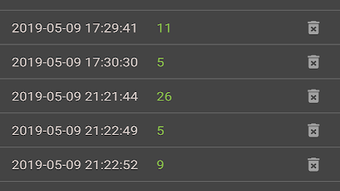
- Daily Calendar Tracking – Displays the total number of pushups performed each day, with the ability to view past performance by selecting a date.
- Monthly Progress Chart – Visualizes workout consistency and improvement over time, supporting long-term fitness goals.
- Minimal Permissions Required – Does not require essential system permissions; only requests storage access to save exercise records.
These features make Pushup Counter ideal for users who want to maintain consistency in their training without relying on external devices. The app supports a frictionless workflow: place the phone on the chest, start pushing, and let the app do the counting. It’s especially beneficial for users with limited access to gym equipment or those who prefer structured, self-guided routines. The integration of historical data and visual charts helps users stay engaged and monitor their progress objectively.
User Interface, Workflow & Performance
The user interface of Pushup Counter is designed with simplicity and functionality in mind. The main screen displays the current count prominently, ensuring visibility during exercise. Navigation is intuitive, with clear access to the calendar and progress chart through a minimal menu. The layout avoids clutter, focusing on essential information and controls.
Workflow efficiency is high, as the app requires minimal interaction once the device is positioned correctly. Users can begin their workout immediately after launching the app and placing the phone on their chest. The proximity sensor activation ensures that counting starts automatically, reducing the need for manual input during intense sessions.
Performance observations are based on general software behavior patterns. The developer did not specify resource usage details. However, since the app relies on a single sensor and does not require constant background processing, it is expected to operate efficiently without significant impact on battery life or system performance. Stability appears to be consistent with standard Android applications of this type, though exact behavior may vary depending on device hardware and Android version.
Compatibility & System Requirements
Pushup Counter is designed for Android devices and is available as an APK file for direct download. The app is compatible with Android operating systems, though the exact version range was not specified. Installation size is not provided, and the developer did not list specific hardware requirements. The app does not require advanced processing power or high-end sensors beyond the standard proximity sensor found in most smartphones.
Compatibility information was partially provided. Users should ensure their device has a functional proximity sensor and supports the necessary Android version for APK installation. The app may not function properly on devices without this sensor or with outdated operating systems. The developer did not specify whether the app supports tablets or other form factors.
Pros and Cons
Pros
- Free to download and use with no in-app purchases
- Accurate pushup detection using proximity sensor
- Simple, intuitive interface suitable for all fitness levels
- Tracks daily and monthly progress with visual charts
- Minimal permissions required; no intrusive access
- Supports manual correction for missed reps
Cons
- Requires a smartphone with a functional proximity sensor
- Performance may vary across different Android devices
- No voice feedback or audio cues during workout
- Calendar and chart features are basic, with limited customization
- APK download requires enabling unknown sources on device
FAQ Section
Is Pushup Counter available on the Google Play Store?
Pushup Counter is distributed as an APK file, which means it is not currently available through the official Google Play Store. Users must download the APK directly and install it manually.
Does Pushup Counter require internet access?
No, the app does not require an internet connection to function. All tracking and data storage occur locally on the device, ensuring privacy and offline usability.
Can I use Pushup Counter on tablets?
Compatibility with tablets was not specified. While some users may be able to run the app on tablet devices, it is primarily designed for smartphones.
Is my workout data secure?
Yes, all exercise records are stored locally on your device. The app does not transmit data to external servers, ensuring your fitness history remains private.
How often does Pushup Counter update?
The developer did not provide information about update frequency. Users should check the official source for the latest version and any available patches.
Final Thoughts
Pushup Counter delivers a focused, no-frills solution for tracking pushup repetitions using a smartphone’s built-in sensor. Its simplicity, accuracy, and free access make it a strong choice for users who want to monitor their upper body workouts without additional tools. The integration of daily tracking and visual progress charts adds motivational value, encouraging consistency over time.
While the app lacks advanced features like voice prompts or cloud sync, its core functionality is well-executed and reliable. It’s especially beneficial for fitness beginners, home workout enthusiasts, and anyone looking to maintain a consistent pushup routine. The minimal permission model enhances trust and usability.
Download Pushup Counter now and take the next step toward a stronger, more disciplined fitness journey.







